I am planning to get certified to teach Biology,
so I imagine there will be many uses for spreadsheets/databases in a Biology
course. Students will be asked to observe data over a series of time
intervals and record their findings. Quantifiable changes can be recorded
in a spreadsheet and a chart/graph can be produced to give a graphical display
of their work.
Now that many spreadsheet and databases
functions can be performed online, they are even easier to use in a classroom
setting. Students can maintain their own files without expensive
software thanks to programs like Google drive, and they can collaborate from
anywhere using whatever computer platform they have access to.
For teachers looking to add more computational
thinking and modeling activities to their classes, I recommend a visit to
www.shodor.org, and I am specifically linking the page for educator activities:
Shodor.org is a organization that develops
modeling and simulation apps for computers to aid in math and science
instruction. There are literally
hundreds of online tools and activities on this site.
Interactivate (from the Shodor.org site) is a set of free, online courseware for
exploration in science and mathematics. It is comprised of activities, lessons,
and discussions. They have apps arranged
by grade level and by subject area and are run from the web browser.
The main page:
And the simulations/apps:
And, now, on to the technology explorations:
Concept Mapping
|
1.
|
Describe what you
learned from exploring this resource. Be thorough in your response.
|
|
|
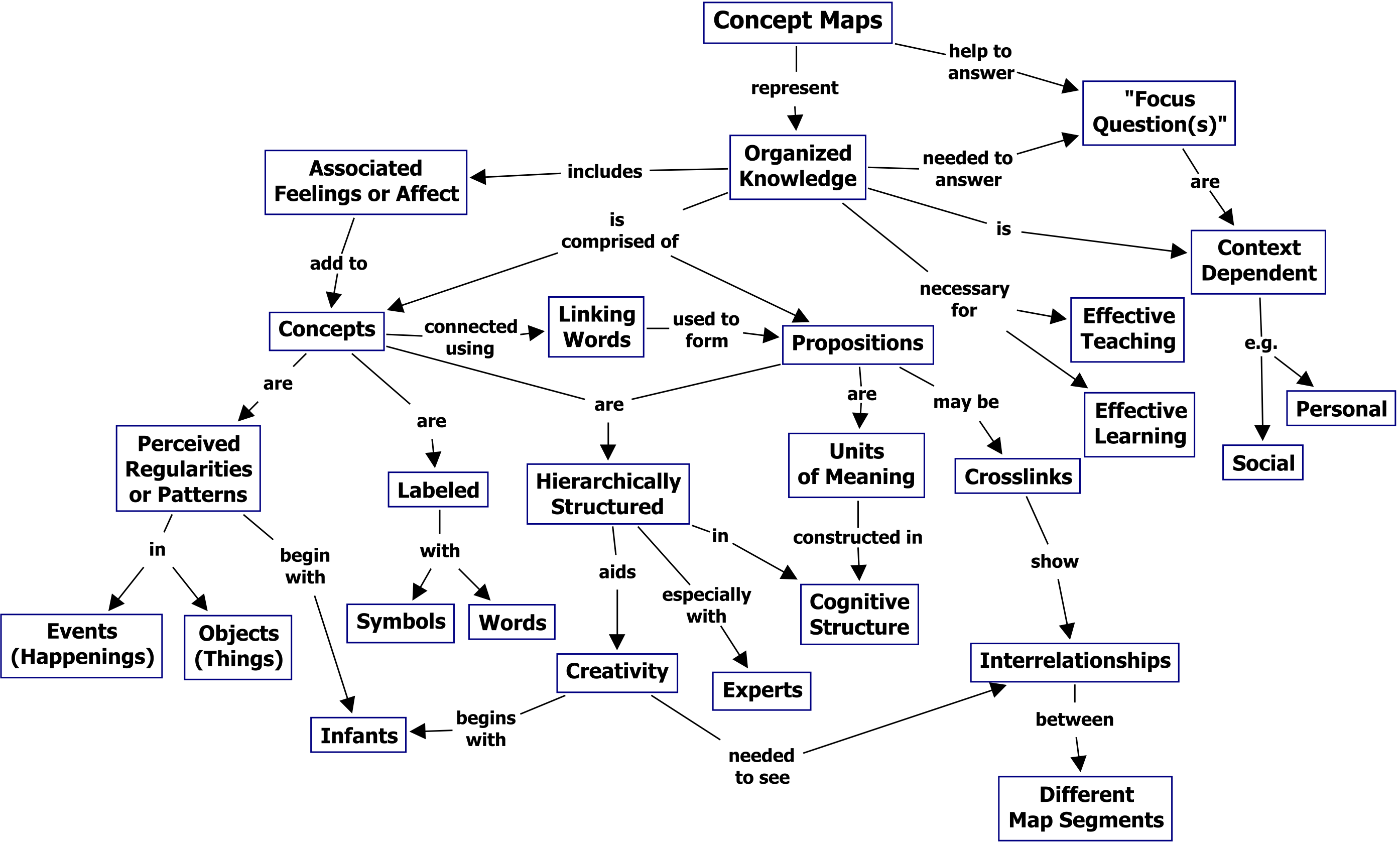
First, I will include a concept map about concept maps, from the daddy of concept maps:  http://cmap.ihmc.us/publications/researchpapers/theorycmaps/Fig1CmapAboutCmaps-large.png This image is contained in the paper cited as: Novak, J. D. & A. J. Cañas, The Theory Underlying Concept Maps and How to Construct Them, Technical Report IHMC CmapTools, 2006-01 Rev 01-2008, Florida Institute for Human and Machine Cognition, 2008 And is available to read here: http://cmap.ihmc.us/publications/researchpapers/theorycmaps/theoryunderlyingconceptmaps.htm What I have learned about concept mapping is better explained in an answer to question #2 as well. |
|
2.
|
How could you use
this resource in a school setting? It
does not matter if it is in your field or level, you need to understand how
the resource might be used in educational settings.
|
|
|
Novak explains the merits of concept mapping as a way to achieve any or all of the following in a learning environment: Assess students' prior knowledge identifying unfamiliar relationships among familiar concepts aid the learning process by helping students incorporate new meanings with prior knowledge (meaningfully) identifying students' valid and invalid ideas modifying misconceptions in a learned idea (particularly problematic in science)
I am sharing this entire paragraph for an example of how
concept mapping could help solve science misconceptions because I found his
research to be very enlightening here:
" To illustrate how difficult it can be for individuals to modify their ideas, especially if they learn primarily by rote, we cite the example of interviews done by the Private Universe Project (PUP) at Harvard University (Schneps, 1989). The staff of PUP interviewed 23 Harvard graduates, alumni and faculty, asking each “Why do we have seasons?” Only eleven concepts, properly organized are needed to understand why we have seasons, and one arrangement of these concepts is shown in Figure 5. The PUP interviewers found that 21 of the 23 interviewed could not explain why we have seasons, a topic that is taught repeatedly in school. Included in this group was a graduate who had recently taken a course in the Physics of Planetary Motion, who also believed erroneously that seasons were caused by the earth moving closer to the sun in summer and further away in the winter. In fact, the earth is slightly closer to the sun when it is winter in Massachusetts, rather than in summer. The primary reason we have seasons in latitudes away from the equator is due to the tilt of the earth on its axis toward the sun in summer resulting in longer days and more direct radiation, thus greater heating. In winter, the axis of the earth points away from the sun, thus resulting in shorter days and less intense radiation. What is interfering with these 21 Harvard people is confusion with the common experience that when we are closer to a fire or lamp, the heat is more intense than when we are further away. Thus, these people have failed to recognize that this same phenomenon is not operating to give seasons on Earth. They are transferring knowledge from one context to another, but incorrectly. This is commonly observed in many, many examples of “misconceptions” in every field of study. The only solution to the problem of overcoming misconceptions is to help learners learn meaningfully, and using concept maps can be very helpful. (For more information on misconceptions in science and mathematics see Novak (2002), and: www.mlrg.org)." Figure 5. One representation of the knowledge structure required required for understanding why we have seasons.
The paragraph and image are both available in the paper
cited above. I feel Novak's explanation would far exceed any
paraphrasing I could do, and I want to give credit where its due.
|
|
3.
|
Would you recommend
this resource to other educators? Like/Dislike; Ease of use, fee or not, and
so forth. Why or Why not?
|
|
|
There are loads of concept mapping programs
available. I have tried coggle.it, and
I found it somewhat easy to use to create, edit and share concept maps.
Cmap tools is the software from Novak that originated
concept maps, and it is free as well:
Wisemapping.com is a free site and has a strong interface
similar to coggle.it. I would
recommend that a teacher get familiar with the process of concept/mindmapping
before purchasing a software package because there are many good free ones
available.
I found this article to be helpful, as it lists several
tools and lists of concept map software, but mostly because it explains the
differences between concept maps and mind maps, the latter of which we
discussed more in class.
|

Animoto
1.
|
Describe what you learned from
exploring this resource. Be thorough in your response.
|
Animoto.com is a site that allows users to
create short videos with professional-looking transitions and music. I was familiar with the site from other
teachers. I am pleased that Animoto
has all the major photo managing sites connected for uploading. I had trouble with getting Animoto to load
my Facebook albums, but I was able to upload pictures individuallyand through
Picasa web albums.
|
|
2.
|
How could you use this resource in
a school setting? It does not matter
if it is in your field or level, you need to understand how the resource
might be used in educational settings.
|
In a
classroom, high quality images are valuable, and a good lesson is
complemented by slideshows, animation, and pictures in a professional
presentation.
The
Animoto blog provides a number of ways to implement video into the
curriculum, one of which is a teacher introduction video.
I like
the ideas of virtual field trip, and moving flashcards as well.
|
|
3.
|
Would you recommend this resource
to other educators? Like/Dislike; Ease of use, fee or not, and so forth. Why
or Why not?
|
Animoto
is very easy to learn and is highly customizable, and the user's expertise
increases with time. I am somewhat
concerned with costs because there are lots of resources out there, and most
are free. For the ones who asking a
nominal fee, that is acceptable, but when you consider that teachers need
dozens of tools at their disposal, paying even a small fee becomes too much.
Fortunately,
educators can get an Animoto Plus account.
You can have an existing account or not, it doesn't matter. You apply for an education account using
your school's email, and they give you a promo code. You can enter that promo code under the
account settings of your existing account, and it applies the pro services
for six months, you can use that code again to get a full year.
|
Google Docs/Google Drive
1.
|
Describe what you learned from
exploring this resource. Be thorough in your response.
|
I have used Google Docs for years as an
individual, but I have not used it as a collaborative tool. It allows you to access your uploaded files
from any computer connected to the internet.
Word
processing documents, PDFs, spreadsheets, and presentations can be edited
directly from Google Drive in the web browser. This was previously called Google Docs, but
they have combined the cloud storage and editing software into one package
called Google Drive. You can quickly
bring up documents you are working on at docs.google.com, but to see
everything, you go to drive.google.com.
Editing
directly in the browser is a major advantage because Microsoft office is not
needed, although you can keep documents saved as Microsoft Office formats, so
that when you download them, they can be opened by office.
|
|
2.
|
How could you use this resource in
a school setting? It does not matter
if it is in your field or level, you need to understand how the resource
might be used in educational settings.
|
Students can work from a web browser on computers that do not have Office software installed, their work is auto saved, and they can access it from home as well. There is no need for flash drives to be assigned or specific stations in the computer lab. It stores all sorts of files, even ones that it can't edit, so it is truly a cloud storage device. Several individuals can work on a shared file, and still have separate google accounts, and this feature would be helpful in the classroom. |
|
3.
|
Would you recommend this resource
to other educators? Like/Dislike; Ease of use, fee or not, and so forth. Why
or Why not?
|
I love
Google Drive for its many features and flexibility, and I used it for
years. It is available to anyone with
a web browser, and works across computers, tablets and phones.
I don't
use it as much now because I have more space in my Dropbox account, but I
have both Dropbox and Google drive installed on my PCs as well as mobile
devices.
|

No comments:
Post a Comment